In this episode of MashTalk, Lance, Pete and I do a deep dive on WWDC and everything Apple announced.
We start off offering our take on the keynote (0:30) and the tenor of Apple announcements.
First up is iOS 10 (8:30) and the impact the new changes coming to Messages on the platform. We spend a lot of time on Messages before moving into a discussion ondifferential privacy (21:25) and whether that can ever offer as good of a predictive experience as services that track you more (Google, Facebook).
We shift on to talk about the new Home app (29:42) and whether Apple can really make HomeKit a thing. Pete goes on a fun tirade about his propane tank. We have a brief discussion about how you can "delete" pre-installed apps (35:15) and Apple Music (37:00).
We move on to the renamed macOS (38:12) and Siri coming to Mac. We round out the discussion to talk about the new look on watchOS 3 (44:35) and the changes coming to its Health and Activity apps. Finally, we finish off with tvOS (49:15) and the fact that Single Sign-on is coming to Apple TV.
Listen to the episode on iTunes or on Stitcher. You can also subscribe to MashTalk on iTunes by clicking the button below to get our latest episodes, instantly. If you like MashTalk, please fill out our audience survey.
In this episode of MashTalk, Lance, Pete and I do a deep dive on WWDC and everything Apple announced.
We start off offering our take on the keynote (0:30) and the tenor of Apple announcements.
First up is iOS 10 (8:30) and the impact the new changes coming to Messages on the platform. We spend a lot of time on Messages before moving into a discussion ondifferential privacy (21:25) and whether that can ever offer as good of a predictive experience as services that track you more (Google, Facebook).
We shift on to talk about the new Home app (29:42) and whether Apple can really make HomeKit a thing. Pete goes on a fun tirade about his propane tank. We have a brief discussion about how you can "delete" pre-installed apps (35:15) and Apple Music (37:00).
We move on to the renamed macOS (38:12) and Siri coming to Mac. We round out the discussion to talk about the new look on watchOS 3 (44:35) and the changes coming to its Health and Activity apps. Finally, we finish off with tvOS (49:15) and the fact that Single Sign-on is coming to Apple TV.
Listen to the episode on iTunes or on Stitcher. You can also subscribe to MashTalk on iTunes by clicking the button below to get our latest episodes, instantly. If you like MashTalk, please fill out our audience survey.
Despite months of varying complaints about Apple Music, the service has nevertheless garnered a healthy following, well over 15 million paid subscribers according to Apple.
On Monday, Apple announced an update to the app coming in iOS 10 (expected in the fall) that may help millions of existing and potential new users get more out of the app.
The app has been redesigned from the ground up. The new design is meant to be more intuitive and simple, an interface shift that many users have been requesting.
Now when you open the app the first thing you'll see is your music Library, which gives you access to a new section called Downloaded Music.
Apple has also added lyrics to the app's music selections (when you scroll down from the top of the currently playing song), which was demonstrated on stage by Apple Music's head of global marketing, Bozoma Saint John, using the song "Rapper's Delight" by the Sugar Hill Gang.
The company also showed off daily curated Playlists. Additionally, the Connect section allows you to follow the feeds of your favorite artists. Apple also demonstrated the new, more simplified looks of Browse, Top Charts, Radio and Stations.
Will it be enough to convince some users not already on Apple Music to give it a try? Only time will tell, but this early look at the new Apple Music is indeed a lot more attractive and as a result could be a little easier to user.
Apple's WWDC 2016 keynote was jam-packed. While all of Apple's platforms will receive big updates this fall through software updates, iOS 10 was arguably the most important one, if only because there are over 1 billion iOS devices in active use globally.
iOS 10, the "mother of all releases" according to Apple CEO Tim Cook, will come with a mountain of new features such as smarter notifications, a new lock screen, a turbocharged Messages app with smarter emoji entry, redesigned Apple Music, more intelligent Siri with an API for third-party integration, a standalone Home app, better Apple Maps support and more.
Even speeding through the two-hour keynote, Cook and company still didn't have enough time to go through everything in iOS 10. Here are 10 killer features Apple didn't talk about on stage that you should be excited for when iOS 10 arrives this fall.
1. Apple's stock apps will be deletable
IMAGE: RAYMOND WONG/MASHABLE
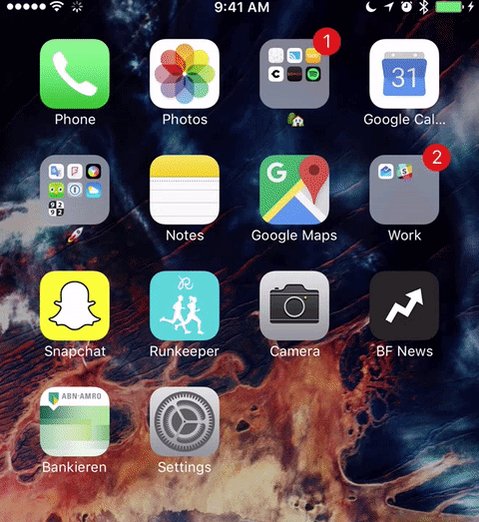
If you're like me, you may have a folder on your iOS device just like the one above where you hide all of the pre-installed Apple apps you never use. Out of sight, out of mind, right?
True, but those apps still hog up storage on your iOS device. In iOS 10, Apple's finally letting you delete them. Well, most of them — Messages, Phone, Safari, Photos and the App Store won't be removable.
But hallelujah to being able to toss Find Friends, Tips and Stocks! (The full list of removable Apple apps is here.) That said, deleting some of them may break certain functions.
2. More specific read receipts
In iOS 7, Apple introduced read receipts to the Messages app. When it's turned on, you can see if a person has read your message(s) or not. I've got it turned off, but if you need to know if someone is ghosting you, you can turn read receipts on.
In iOS 10, you can now turn on read receipts for a specific contact or specific group chat versus having it turned on/off for every contact and conversation.
3. New app and folder animation
By default in iOS 7 and higher, when you open and close a folder of apps, the animation zooms in and out of the folder itself. It's a fancy animation, but the optical effect can give you a headache. You can turn on "Reduce Motion" (Settings > General > Accessibility > Reduce Motion) to turn the animation off and replace it with a gentler fade effect, but most people don't even know they can do it.
In iOS 10, it would appear the folder animation's changed and launching apps within the folder now zooms in from the center of the screen instead of from its specific placement within the folder. This could change by the time the OS launches in fall, however.
Advanced photographers shoot in RAW, not JPEG. For those who aren't photo nerds, RAW files are image files that are not compressed and contain more imagery data. Photographers swear by RAW because it gives them more flexibility during the editing process to either adjust how an image looks or recover details lost when shot as a compressed JPEG.
According to one developer on Reddit who has already installed iOS 10 beta, you'll be able to shoot photos in RAW and edit them. Apple's own developer website alsoreferences RAW files.
Currently, no iPhone or iPad can shoot photos in RAW. Could this be one of the big camera features coming to the iPhone 7 or maybe the iPhone 7 Plus, which is rumored to have two rear cameras?
It wouldn't be a surprise considering most high-end flagship Android phones have the ability to shoot in RAW already.
6. Bedtime, Wake Alarm and new stopwatch
The Clock app has a Bedtime and Wake Alarm feature. Bedtime lets you set a bedtime and get reminders to prod you into getting into bed and Wake Alarm helps you wake up at a specific time every day.
Wake Alarm
IMAGE: SCREENSHOT: APPLE
Bedtime
IMAGE: SCREENSHOT: APPLE
The stopwatch also has a new dial look instead of just digits:
IMAGE: SCREENSHOT: APPLE
Also, notice how the new UI is black and not white.
7. Optimize storage
Storage is always at a premium. In iOS 10, it looks like there's a new "Optimize Storage" feature that automatically removes music from your device that you haven't listened to in a while.
IMAGE: SCREENSHOT: APPLE
As you can see in the screenshot above, there are different options you can set for deleting songs. It's useful if you still store music locally on your device, but I doubt it'll help if you listen to your music through music streaming services like Apple Music, Spotify or Tidal since the songs are all stored in the cloud.
8. Game Center is dead
Game Center, iOS's online social gaming network, is no more. In iOS 10, the app that nobody ever uses (sorry, if you're in the 1% who does) has been removed.
I'll keep it short and sweet: You probably won't miss it.
It's beyond me why you would need to open more than 36 tabs (the max limit in iOS 9) in Safari, but if it just wasn't enough, we've got good news: iOS 10 supports unlimited tabs in Safari.
Sounds great on paper, but remember that you iOS device may end up choking up at a high number of tabs just because it does have a limited amount of RAM to cache all those tabs.
Regardless, I look forward to seeing somebody put the unlimited tabs limits to the test.
10. Live Photos stabilization
Live Photos is a cool idea, but the majority of the animations you make end up looking like total turd due to their shakiness. It's so bad, Google made an app called Motion Stills to stabilize your Live Photos and make them less blurry. It's a really simple, but useful app.
Before closing out the presentation on iOS 10, Apple threw up a slide with many new features it didn't have time to cover. One of includes "Live Photos stabilization." Whether that's all done in the background is unclear, but we're hopeful it'll be as good as what Motion Stills produces.
You've all seen the Apple Watch's app screen before. Even though the device has only been out for a year, the Apple Watch's app cloud has become iconic — the face of the smartwatch — just as the iPhone's grid of apps has.
At WWDC 2016, Apple walked us through all of the improvements in watchOS 3, including showing off speed improvements, new watch faces, and even a new meditation app called Breathe, but not once did it show the iconic app screen during its keynote.
The beautiful screen, activated by pressing the digital crown, will still exist when watchOS 3 launches this fall, Apple has confirmed to Mashable. But you won't need to use it as much.
Pretty, but slow
When Apple first unveiled the Apple Watch in the fall of 2014, the apps screen was the literal face of the device, showing just how functional and innovative the creation of the digital crown was. Turning the digital crown lets you zoom closer into an app, without covering the small screen with your finger. Keep turning the crown and zoom in deep enough and you can launch the app.
In video spots, advertisements and photos, the screen is a beautiful display of all the things you can do with the Apple Watch with apps.
It's alluring, sophisticated and sleek. It's classic Apple design that makes competing products look like complete unthoughtful hot trash. I mean look at how pretty our Apple Watch photos from our review came out:
Users can even arrange apps in any layout they want, adding another level of personalization to the Apple Watch.
In practice, though, the iconic app screen's UI, is a failure.
As a person who has worn an Apple Watch for a year now, I can say definitively I almost never access the app screen. Using the digital crown to zoom in and out of apps sounded groundbreaking on paper, but in the real world it was more disappointing.
In the few times I tried to zoom into and launch an app, I always ended up zooming into the wrong app. (Pro tip: It zooms into whatever app is center-aligned on the screen.) And as pretty as the effect is, it's not fast. In fact, it's really slow.
Speed boost
With watchOS 3, how you launch apps on Apple Watch will likely change in a meaningful way.
At WWDC, Apple emphasized the new dock in watchOS 3, which is accessible by pressing the side button, which then takes you to a row of apps that you can swipe left and right between.
Apple says the dock lets you access your vital apps faster without needing to dive into the endless grid of apps on the app screen. In other words, never mind about that silly app cloud if you found it annoying.
Apple confirmed to Mashable the dock is only for accessing recent and favorite apps and not allof your apps. Users will be able to pin up to 10 apps in the dock. The dock won't be replacing the app screen, where the rest of your apps will exist.
But if you get to the dock by pressing the side button, what happens to the friends shortcut for messaging, calling and sending Digital Touch doodles — what the button currently activates? Those features will be integrated into the Messages and Phone app (messaging and Digital Touch in Messages and making calls in Phone), Apple says. Good riddance, I say.With the dock, you'll spend less time pecking around on the app screen searching for the right icon. Also, it's unlikely you'll ever use more than 10 core apps on a daily basis. So the dock is a huge plus in my book.
Habits are usually hard to change. But once watchOS 3 arrives, I'll finally be able to use apps (native and third-party) instead of spending an eternity locating them on the app screen and waiting for them to load.
The dock looks to be just the thing to make apps the main attraction on the Apple Watch — the way it should have been at launch. Better late than never, I suppose.




 Popular
 Tags
 Videos