Apple's iPad Pro currently comes in two sizes: 12.9 and 9.7 inches, with the latter variant sharing the form factor with the Pencil-less iPad Air. But according to a new report by KGI's analyst Ming-Chi Kuo, first noticed by MacRumors, the company might introduce a third, 10.5-inch option next year.
That device is likely to be launched alongside an updated 12.9-inch iPad Pro as well as a "low-cost" 9.7-inch iPad, presumably a successor of the iPad Air 2. There's no word about an update to the iPad mini.
Why another tablet size? According to Kuo, this might be the iPad that'll help Apple win tenders in commercial and education markets. Both devices will reportedly sport Apple's upcoming A10X processor, while the 9.7-inch new iPad will have an A9X processor.
Kuo further claims that Apple is working on a "revolutionary" new iPad with a flexible AMOLED screen that should come out in 2018.
"If Apple can truly tap the potential of a flexible AMOLED panel, we believe the new iPad model will offer new selling points through radical form factor design and user behavior changes, which could benefit shipments," Kuo wrote in his report.
The predictions are bold — the 10.5-inch iPad could cluster Apple's messy iPad line up even further, and a two-years-from-here iPad with a flexible screen (though that could just mean curvy) sounds like sci-fi at this point. Kuo, however, accurately predicted a fair amount of facts about Apple products; his recent prediction, that of an OLED bar-equipped MacBook Pro, has not materialized yet, but it has been widely confirmed by other reports.
For authors and would-be authors, the long wait is over. The beloved writing app Scrivener has finally released an iOS version — and fans in the writing community are stoked.
When Scrivener made its debut on the Mac in 2007, it was widely celebrated as one of the best tools for fiction and nonfiction writers who needed an all-in-one app. It organized chapters, research material and word processing, all under one roof.
The passionate support around the app has only grown over the years. Scrivener's popularity increased in lockstep with the rise of the self-publishing community that has flourished on Amazon. But some of that interest has waned in recent years — as calls for an iOS version of the app went unanswered, and competitors popped up to meet the mobile needs of the self-publishing community.
Ulysses, which was released in 2013 and recently won an Apple Design Award, has emerged as a strong desktop alternative to Scrivener. Ulysses released its iPad version last year, beating Scrivener to the punch — and stealing many Scrivener fans who gave up waiting for an iOS version.
The remaining Scrivener holdouts — which, based on early reactions on social media, is still a fairly large group — have been rewarded for their patience. The iOS app is snappy, highly responsive, and a near-perfect mirror of the desktop version.
Priced lower than Ulysses' iOS app, which costs $24.99, the $19.99 Scrivener for iOS is designed for both the iPad and the iPhone. It lets you pinch to zoom and shrink documents; it can import research documents and media files; and it has many of the organizational and document output options (Word, Final Draft, Plain Text and PDF) the desktop version offers.
The only major failing is the app's lack of iCloud functionality. To sync documents between devices, Scrivener for iOS requires Dropbox. In this regard, Ulysses for iOS wins again, as it allows users to sync documents using iCloud.
Regarding the multi-year wait for the app, Literature and Latte, the company behind Scrivener, is taking a humorous approach to past complaints about the app's delay.
"A big thank you to all the Scrivener users who cheered us on and sent us words of encouragement during the tortured development cycle of our iOS version," the company says in the iOS app's developer notes. Thanks to miscellaneous coders, "we got through them like Spinal Tap gets through drummers."
In short, diehard Scrivener fans will be largely satisfied with this long-awaited mobile option for the beloved app. So far, it seems Scrivener for iOS is worth the wait.
Apple wasn't kidding: iOS 10 is going to be a huuuge release with a boatload of new useful features.
From a revamped Messages experience, to third-party app integration with Siri, to improved Photos, to a redesigned Apple Music, to all of the things Apple didn't tell you, there's going to be a lot to take in.
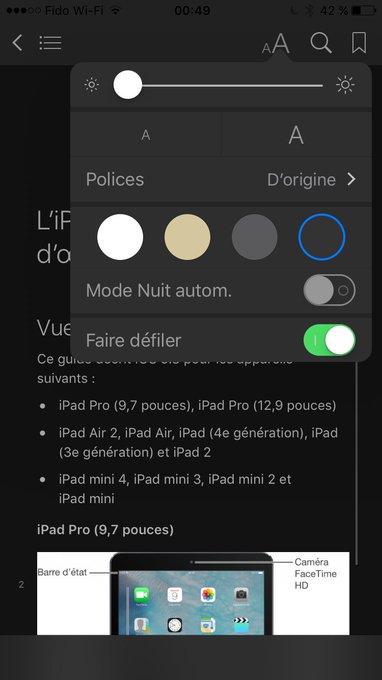
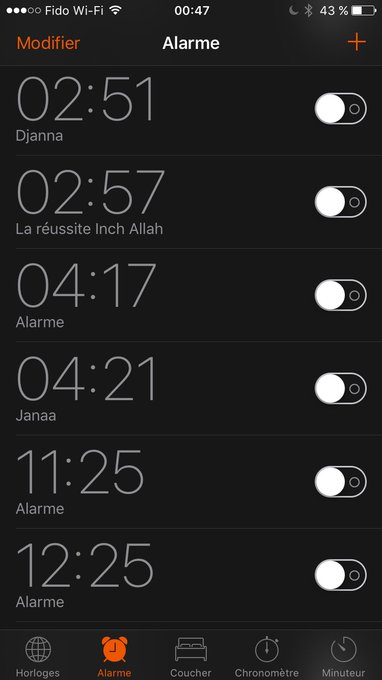
Users testing out the iOS 10 developer preview beta have just discovered another much-asked for feature: A dark mode, which turns the interface's bright white backgrounds to black for a less blinding look.
Dark mode is also easier on the eyes, especially when you're using your iPhone at night with the lights turned off or in a dim place like a bar.
Some Android phones like the OnePlus 3 have a dark mode theme that can be switched on.
We already knew the new Clock app had a black "dark mode" interface, but it also appears the dark system theme will extend to other apps like iBooks, Safari, Alarm and iTunes.
For more details on iOS 10, check out Mashable's hands-on preview.
Apple’s Worldwide Developers Conference is the Cupertino tech giant’s once-a-year paean to its vast network of third-party developers who, for the most part, build all the apps you know (and many you don’t) and love (and many you don’t) on your iPhones, iPad, Apple TV, Apple Watch and, of course, the granddaddy of them all, your Mac.
This year Apple CEO Tim Cook, SVP of Software Engineering Craig Federighi and, possibly, a collection of other Apple executives, will take the stage at the Bill Graham Civic Auditorium (an unusual choice in and of itself) and walk us through the next versions of all its platforms. Everything from watchOS and tvOS to iOS and OS X will get a look.
The entire keynote, which kicks off on Monday at 10 a.m. Pacific Time, could last more than 2 hours. Cook and company will need all that time to get through all of that and to wow us with a more powerful Siri voice assistant and its new, highly-anticipated SDK.
They might even tease a bit of hardware, though don’t expect any new categories. It’s not that kind of event.
Seated as close to the front as possible will be your intrepid team of Mashable reporters, including me, Senior Tech Correspondent Christina Warren, Deputy Tech Editor Samantha Murphy Kelly and Apps Reporter Karissa Bell. We’ll be live-blogging right here and covering it on our social feeds. Follow along here, there and everywhere Mashable lives. We’ll make sure you get the full picture on Apple’s plans for your favorite devices. You can sign up below so you get a reminder when we kick off the live blog.
in Bensonhurst, watching kindergarteners create robots on an iPad.
It’s one of the cutest things I’ve ever seen, and I don’t even like children.
The exercise is part of the curriculum led by co-teachers Stacy Butsikares and Allison Bookbinder, focused on helping the 5- and 6-year-old students come up with ways to solve problems.
The first step is to identify a problem happening in the school. The kindergarteners come up with ideas like kids horsing around in the lunch line, or not throwing trash away properly, or making too much noise at recess. Students are instructed to create a robot that could solve the problem, and draw the robot on a piece of paper.
Once the robot is sketched out, the real fun begins. Using the app The Robot Factory, these pint-sized problem-solvers bring their robot ideas to life.
Kids aren’t throwing trash away? That’s OK, a robot with long, winding arms can pick up the trash with its claw and store it in its stomach. Kids are too loud at recess? A robot with a booming voice can say “Be quiet” as it hovers around the students.
The kids can design their robots to their hearts' content — adding wings, propellers and jetpacks to make them fly, and adding features like a camera (to take photos of interlopers) or voice recordings to make them more fun.
IMAGE: CHRISTINA WARREN/MASHABLE
It’s clear the kids are having fun — and they're learning, too.
The Robot Factory was named Apple’s 2015 iPad App of the Year. It’s from the team at Tinybop, a software development shop based in Brooklyn. Founded in 2013, Tinybop has 11 apps, all aimed at the education market.
Founder and CEO Raul Gutierrez thinks a lot about how kids play and their play patterns. Tinybop’s office in Downtown Brooklyn is replete with classic education posters. It even has a library full of old books from the ’60s and ’70s.
A kindergarten student at The Academy of Talented Scholars in Bensonhurst designs a robot on an iPad.
IMAGE: CHRISTINA WARREN/MASHABLE
You get the sense that Gutierrez is trying to re-create some of that educational magic from an earlier, pre-connected time, on the iPad.
Although Tinybop’s apps — with titles like The Human Body (which explores the human body), Plants (a focus on nature) and Simple Machines (physics) — are aimed at education, they aren’t teaching a specific curriculum. Instead, Gutierrez is hoping to create a model that gets kids to create and answer questions.
Which is why The Robot Factory is being used in a kindergarten classroom. Rather than simply using the iPad to do rote memorization of numbers and letters, the kids use the tool to solve a problem. Moreover, the iPad isn’t even the sole focus of the lesson. Before the students could even create their robot, they had to identify and write out the problem and then sketch the solution.
Unlike a lot of apps aimed at kids, Tinybop’s apps are designed for quiet. Gutierrez says that a lot of children’s media “gamifies the experience” with Pavlovian bells and whistles, but he thinks this distracts from the play and learning potential.
Instead, in apps like The Robot Factory, sounds are limited to effects — like the whirring of propellers — or added voice input.
Tinybop’s apps are also developed in a way that encourages exploration, without hand-holding to let kids know what happens.
This was evident watching the kindergarten students play with the app. Faces exploded with glee when they realized they could add a new attachment or make a robot move in a certain way that wasn’t expected.
“It’s okay to slightly disorient kids,” Gutierrez said.
Tinybop’s business model is interesting because all of its apps are paid. When I spoke to Gutierrez last month, he explained that it was important to make content worth paying for.
Apps sell for $3.99 or are available in collections. But Tinybop sees a tremendous amount of sales to educators who (like the teachers at PS 682) use the apps in the classroom.
Teaching the next generation of coders
The iPad is used for older students as well.
At the Berkeley Carroll School in Park Slope, every student in grades 3 through 12 gets an iPad that is integrated into their curriculum.
In the Digital Essentials class, fifth and sixth grade students learn the fundamentals of programming using Hopscotch, a visual programming language that lets kids build apps entirely on the iPhone and iPad.
Watching 11-year-olds build their own versions of Subway Surfers using the iPad and Hopscotch was a riveting experience. The students were building real, functional games and doing it on the iPad.
Middle school students at The Berkeley Carroll School in Park Slope code their own games using the programming language Hopscotch.
IMAGE: CHRISTINA WARREN/MASHABLE
Hopscotch was launched in 2013 by Jocelyn Leavitt and Samantha John. It was founded, in part, to help get young girls interested in programming. Leavitt is a former teacher who had an interest in technology; John was one of the only female engineers at her company.
“In talking to a lot of our friends who are a lot of good hackers who all look demographically really similar, we found the same story coming up over and over again," Leavitt said. "They got interested in programming at 11 or 12 because they played video games and wanted to learn to make their own."
The original goal was to build a tool that young girls would want.
Understanding that there are essential building blocks and ideas that are key to all programming languages, the idea for Hopscotch was to be a visual coding language that would allow kids to code apps directly on the iPad.
Similar to MIT Media Labs’ Scratch, the idea behind Hopscotch is that kids can build programs using a visual interface, dragging and dropping blocks rather than having to type out commands.
“The problem with typing code is it's really prone to error,” Leavitt said. “What we’re trying to do is figure out a better interface for programming.”
It turned out that the iPad was the perfect device for Hopscotch because it’s tailor-made for the visual, touch-centric nature of a drag-and-drop programming interface.
And tablets — along with smartphones — are the computers kids interact with the most. Leavitt says that for their product, the iPad is actually better than a traditional computer. Not only is it the computer kids use the most, these devices aren’t intimidating in the same way programming on a regular computer could be.
Leavitt says that although schools weren’t the specific target for Hopscotch, it was clear early on that the classroom was a perfect fit for the product.
The Hopscotch team offers up free curriculum to schools and teachers to help them get the most out of the platform. This is in part because most computer science teachers at schools across the United States are not trained with programming. Because of this, Leavitt — a former teacher — felt it was even more important to help offer lessons and curriculum so that instructors could be up to speed too.
On its YouTube channel, Hopscotch posts tutorials for various projects. Check out this video that shows how to re-create Flappy Bird in Hopscotch.
This is the case at Berkeley Carroll, where the class I audited was taught by a teacher who doesn’t have a background in programming but has gone on to successfully teach the Digital Essentials. Still, that didn’t prevent the teacher from actively helping students and teaching the curriculum.
The open-ended nature of Hopscotch — there isn’t just one way to solve a problem — also allows kids (and teachers) with different interests to express themselves through code.
Liza Conrad, who heads up community and partnerships at Hopscotch, says that more since Hopscotch launched in 2013, more than 6 million projects have been published to the platform using only the iPad.
So what happens after kids master Hopscotch? Do they continue coding? Conrad says that the team receives fan mail all the time (something she calls “really gratifying”) from kids who have parlayed their experience with Hopscotch into learning other languages too.
Conrad even said that one of their “most prolific” users who started using Hopscotch at age 12, has now parlayed those skills into a high school programming internship.
For more than just consumption
Educational apps like The Robot Factory and programming languages like Hopscotch go a long way towards dispelling the myth that the iPad is just for consumption.
Although that meme has dissipated quite a bit since the device’s release in 2010, there is still often an idea the device is best-suited for consuming, not creating.
And that’s just not true. Watching kindergarten and middle school students alike use the iPad, it was clear that to these kids this is their primary computer.
Which isn’t to say there isn’t competition. Google is pushing Chromebooks hard – especially in education.
Still, education has always been a big focus for Apple and its clear that is only going to continue. Many of the big iOS 9.3 features for the iPad were aimed strictly at education.
With iPad sales continuing to stagnate, focusing on education makes a lot of sense. After all, it’s clear the kids love using them in the classroom.
Following complaints that the iOS 9.3.2 update has bricked newer iPads, Apple pulled the latest update for the 9.7-inch iPad Pro.
"We're working on a fix for an issue impacting a small number of iPad units that are receiving an error when trying to update the software," Apple said in a statement to Mashable Friday. "We'll issue an update as quickly as possible."
While the company did not specify which iPads were affected by the update, multiple outlets have reported that the update is hamstringing the 9.7-inch iPad Pro and not the 12.9-inch version or other Apple devices.
Users reported experiencing the error, which prompts the device to display a "connect to iTunes" message that typically occurs when iDevices enter recovery mode, after updating 9.7-inch iPad Pros with iOS 9.3.2 earlier this week, 9to5Mac reported. From there, users encountered an Error 56 message in iTunes, and Apple has advised those who have not yet updated their devices to refrain from doing so, and those unable to restore their devices to contact Apple Support.
Several users affected by the update reported having the hardware in their 9.7-inch iPad Pros replaced at Apple's Genius Bars, 9to5Mac reported.
Apple did not specify when the iOS re-release would be issued for affected devices and in the meantime 9.7.-inch iPad Pro users have been reverted to iOS 9.3.1.
Apple's most recent iOS recall came two months ago when users reported iOS 9.3 was bricking the iPad 2.
Despite its name, the iPad Smart Cover is not particularly smart; it folds well and wakes your iPad from sleep, but that's about it.
Judging by a patent recently granted to the company by the U.S. Patent Office, dug out by Patently Apple, the Smart Cover might become a lot smarter in the future.
Titled "Cover attachment with flexible display," the patent describes a foldable cover for a tablet device with a "flexible display" built in.
Apple sees this approach as an alternative to making the actual tablet bigger.
"Increasing the display area could lead to a significant expansion in functionality. Unfortunately (...) device manufacturers generally choose between making the display and therefore the device itself larger, thereby reducing the portability or making the device and display smaller with the result of a less functional device," the patent text explains.
An iPad cover could act not only as a screen, but also as a surface to type or write on.
IMAGE: APPLE, USPTO
The advantages of having a second screen are obvious: You could have it display auxiliary info, such as the title of the song or movie currently being played on the tablet, alongside touchscreen controls. It could be used as a full-fledged second display, comparable to that of the main display; alternatively, only a portion of the cover could be a screen, with the rest reserved for solar cells.
There's a lot of ways to make a tablet cover more useful; placing a smaller screen and some solar cells on it is one alternative.
IMAGE: APPLE, USPTO
As always, a patent does not necessarily means such a product will see the light of day soon, or ever.
What's interesting about this patent is that it was originally filed in 2011 (we covered it in August 2012), and though some of the concepts from it actually came to life (the iPad Pro's smart connector is one example), some of them are still quite futuristic. We certainly hope Apple will continue to innovate in the tablet area, despite iPad's steadily dwindling sales.






 Popular
 Tags
Tags Videos