• unilogou. Powered by Blogger.

    Showing posts with label FAMILY. Show all posts
    Showing posts with label FAMILY. Show all posts

    Wednesday, 27 July 2016

    How Google Street View lets people reconnect with lost loved ones

    Posted By: Uni logo - 12:42:00
    Https%3a%2f%2fblueprint-api-production.s3.amazonaws.com%2fuploads%2fcard%2fimage%2f156434%2fgoogcar

    Technology is changing the way we connect with our family and friends, so it only makes sense that it would also change how we remember them — something Google Street View is facilitating in surprising new ways. 

    In recent years, more and more users of Street View have been harnessing the power of the service's time shift feature, which allows you to move backward and forward in time to sometimes catch loved ones as they were captured by Google's Street View cameras. 
    Google's street mapping tool offers images of a wide range of locations dating all the way back to 2007. Because of that, some users are taking nearly decade-long trips back in time and discovering images of deceased members of their families as they were photographed at their addresses. 
    Mashable's New York office as it looked in 2007, long before the company took up residence in the building.
    IMAGE: GOOGLE STREET VIEW
    When compared to a photograph of the same address from more current Street View scans, the contrasting images offer a surprisingly stirring bit of nostalgia only possible in our new digital context. 
    Yes, the faces are, as a rule, blurred, and you'll usually only find someone you know if you know exactly where to look. But equipped with the right address and a sharp eye for detail, Street View turns into a kind of "god view" of the world, exposing moments in time you wouldn't have otherwise seen.  
    A search on social media services like Twitter and Facebook quickly reveals a number of surprise Street View memories unearthed by users. But some, like Bill Frankel, have mustered up the courage to share their emotional discoveries. Last month, Frankel shared the pain of his brother stumbling upon their father on Street View, just months after his death. 
    Another user, going by the name "DUCKS_PDX503" on Reddit, shared his story of finding an image of his grandmother added to Street View just prior to her passing. 
    An image of a Reddit user's grandmother.
    IMAGE: GOOGLE STREET VIEW
    "What surprised me, was that Google captured one of the last few pictures of my grandma, because she passed away less than a year after that picture was taken," the user wrote. "I thought it was such an uplifting and awesome picture because it showed just how laid back and awesome she was."
    But the Google-facilitated reminiscing isn't limited to human connections. A number of users have taken to Street View to surface old images of their beloved pets as well. 
    And whether the subject is furry or related by blood, no one is immune to the inadvertent magic of Street View. 
    While researching the story for more Street View-powered remembrances, I decided to try it out on one of my own deceased relatives. To my surprise, back in 2007 (the year Street View was launched), I found the familiar image of my late grandmother's car in her Florida driveway and, when I moved the time span control to present day, the driveway and the house were devoid of any trace of her time there. I sat and stared at the image, letting the feelings associated with the memory of my time with her there wash over me. And I was grateful for the accidental archive. 
    That brief dip back in time provided a powerful tableau of two family images — present and past — juxtaposed against Street View's normally utilitarian function, and it's something I won't soon forget. 
    Hopefully, Google will take note of this increasingly common cultural hacking of its mapping service by its users and find a way to make these digital ghosts live on, impervious to software updates and database refreshes. In a perfect Street View world, everyone gets to live forever.

    Friday, 6 May 2016

    A closer look at Samsung’s connected Family Hub Refrigerator

    Posted By: Uni logo - 13:33:00


    Imagine for a moment that you’re a fly on the wall of a Samsung executive board meeting. It’s pretty easy to imagine why the Family Hub Refrigerator seemed like a great idea.
    Someone probably said something about leveraging the smart home and disrupting the kitchen and they were off to the races. And sure, there are certainly pieces of the fancy new smart refrigerator that make a lot of sense.
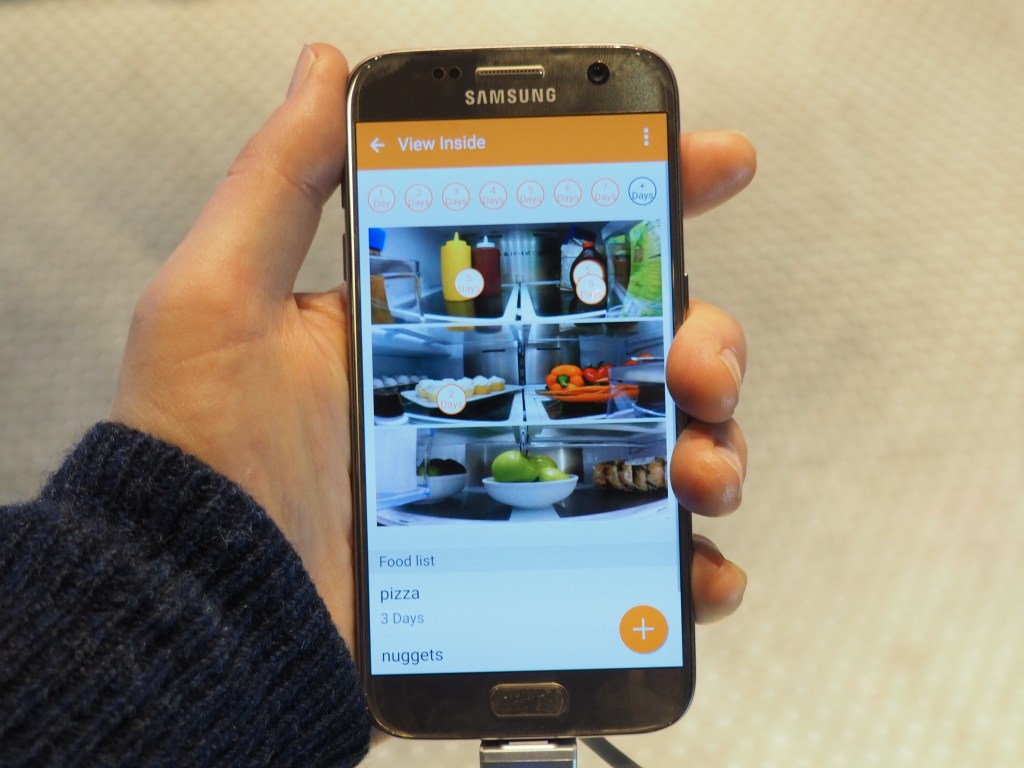
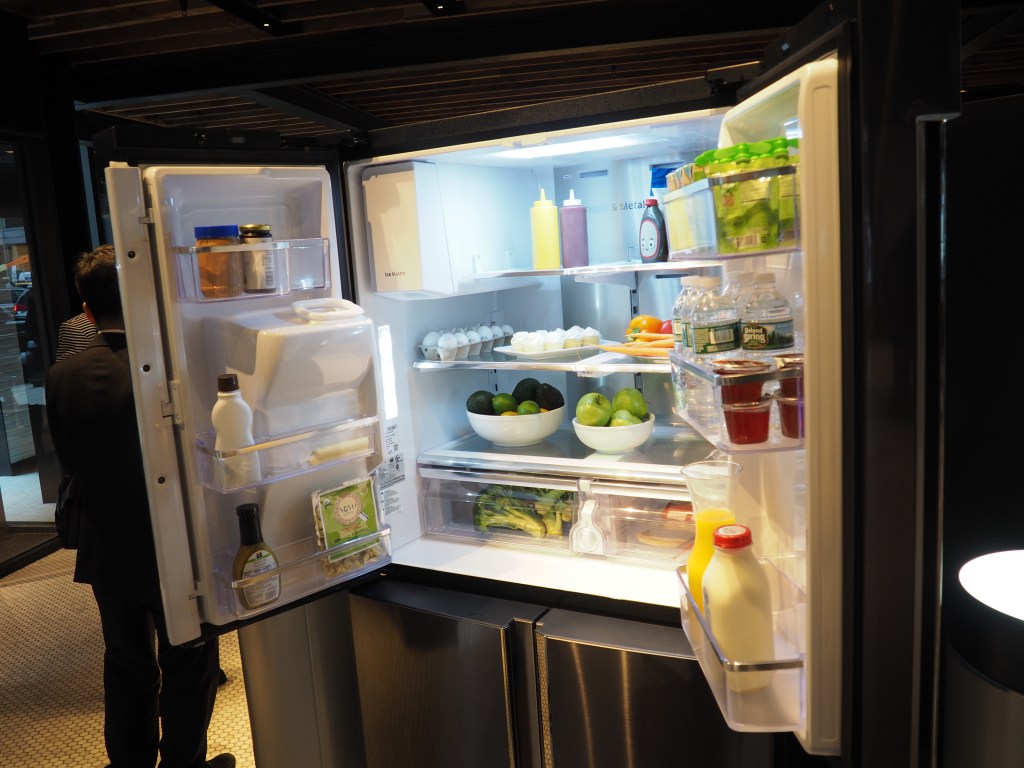
    Take the trio of cameras that line the inside of the door, snapping a shot of the fridge’s contents when it closes. That, coupled with wireless connectivity, means that Family Hub owners can take a quick look at the contents of the fridge via a mobile  app.
    As someone who regularly forgets about half of my shopping list when confronted by buzzing overhead lights and endless condiment aisles, I would definitely use the feature on a regular basis.
    There are, however, a few shortcomings with what is a strong contender for the fridge’s best feature — namely, the fact that it doesn’t cover the entirety of its interior, instead hitting three shelves and missing the doors completely.
    But the cameras are really just a side note to the Hub’s main event. When the appliance was first unveiled back at CES, the press took to calling it a refrigerator with a tablet built into the door.
    OLYMPUS DIGITAL CAMERA
    At a press event in New York City today, the company attempted to do some damage control against the perception, insisting that it is, in fact, a lot more.
    Samsung reps really hammered home the three product cornerstones of family, food and entertainment (why the aforementioned boardroom didn’t opt for a third F of “fun” is beyond me).
    The “family” bit pertains to the screen’s functionality as digital refrigerator magnets, i.e. the sharing of pictures, notes and calendars. The “food” bit is pretty self-explanatory, while the “entertainment” part pertains to the device’s built-in speakers for playing third-party apps like Pandora, as well its ability to mirror video from Samsung’s smart TVs.
    Samsung Family Hub Refrigerator
    Maybe the Family Hub is, in fact, more than just a refrigerator with a tablet built in, but it’s hard to look beyond the fact that pretty much everything you can do on the fridge screen you can do on a standard tablet, including the aforementioned entertainment options and the ability to order food from places like Fresh Direct.
    There are, as we previously noted at the product’s launch, some notable downsides to combining the two, the big one being that refrigerators are built to have much longer life cycles than tablets, meaning you’re stuck with that basic touchscreen functionality for as long as you keep the fridge.
    Samsung Family Hub Refrigerator
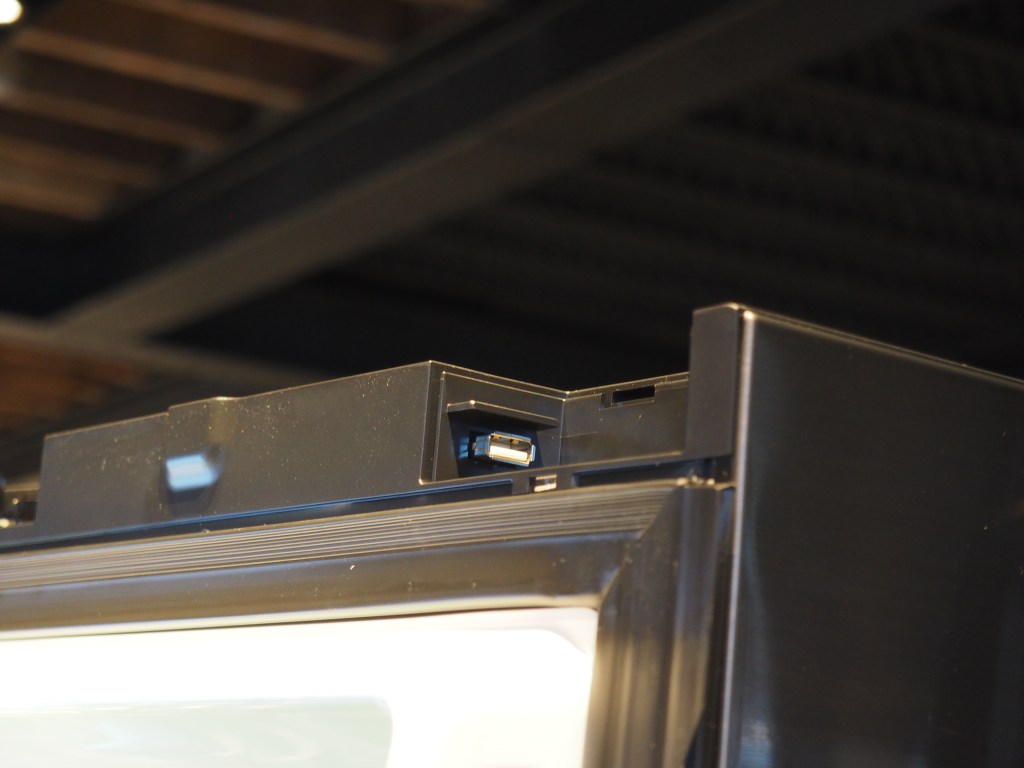
    There will be updates, of course, both over the air and through a hardwired USB port hidden behind the door. But the operating system has some key limitations. It’s that old Samsung standby, Tizen, making the current app selection extremely limited. The company promises to roll out more apps in the future, which users will be asked to opt into or out of, rather than just downloading individually through an app store.
    Samsung is likely on to something with the addition of connectivity that offers compelling features like remote monitoring, but the overall execution still feels mostly like a novelty. A novelty that starts at $5,800. But if that all sounds appealing, you can pick one up starting today.

    Sunday, 1 May 2016

    How to talk to your babysitter about online privacy

    Posted By: Uni logo - 12:24:00
    Http%3a%2f%2fi.blueprint.mashable.com%2fwknjszcgijmpvxxl72fapvmv_9c%3d%2fblueprint-api-production.s3.amazonaws.com%2fuploads%2fcard%2fimage%2f75428%2fgettyimages-521704237

    My first date night out with my husband after our daughter was born was nerve wracking. Would she be fed? Would she sleep? I constantly checked my phone for updates from the sitter. Nothing.
    Then, I logged into Facebook. In my feed I saw three pictures of my adorable baby being snuggled by the sitter. It was reassuring but also worrying. Up until that point all of our baby pictures on social media were accessible only to family and friends.
    As a writer who makes her living online I was worried strangers would take photos of my daughter and use them without my consent. It's a safety concern if people in the area know my children are home without an adult present. For some parents, keeping their children off social media is about protecting them from privacy concerns of facial imaging software and data mining. Other parents worry about future backlash, like bullying in school or losing out on future job and college prospects.
    As children get older even they are pushing back for more privacy, requesting that their parents not post about them online.
    In a recent blog post for Mom.me, Meredith Gordon noted that she doesn’t want her sitters taking pictures of her kids at all, because her children are not someone else’s content.

    Our rules are slightly more flexible. I don’t mind a picture here or there but we prefer that names aren’t used.
    Discussing these rules with a sitter can be awkward. Caregivers who are Generation Alpha might not have the same concerns about privacy as parents. Laurie Gray, a trial attorney, child advocate and founder of SocraticParenting.com, encourages parents to be up front about their rules and expectations. “The key is to suggest some simple, clear rules, discuss them with your children and babysitter to make sure everyone has input, understands and is on board.” She suggests typing guidelines and posting them on the bulletin board or refrigerator for easy reference by the sitter and children.
    Lynn Perkins, CEO and founder of UrbanSitter, suggests firm rules in place before you talk to your sitter. She suggests a range of social sharing options:
    1. Never take photos or videos of my kids.
    2. It’s okay to take photos or videos of my kids, but for these purposes only:
      • To send me as an update, but photos or videos should be deleted immediately afterward.
      • To capture a memory, which you can keep, but photos or videos should never be shared on social media.
    3. It’s okay to take photos or videos of my kids and share them on social media with these exceptions:
      • Do not use my kids’ names or our last name.
      • Do not tag people or locations.
    4. It’s okay to take photos or videos of my kids and share them on social media. Be sure to tag me, so I can see the posts.
    A good sitter will respect your wishes, Perkins notes.
    Gray adds, “Most parents do want their sitter and children to be able to communicate with them, so they don’t want completely cut off access to the electronic devices. What seems to work best for most parents is: 1) Agree; 2) Trust; 3) Verify; 4) Revise the Agreement as needed; and repeat. If trust becomes a significant issue, you may need to look for a new babysitter.”
    As for us, I was able to talk to my sitter about our social media rules for our kids and she handled it well. Not only is it a privacy issue, but it’s a safety one that modern parents need to be aware of.

    Saturday, 30 April 2016

    special experiences to share with long-distance moms

    Posted By: Uni logo - 11:40:00
    Gettyimages-469770423

    If you'll be far away from mom this Mother's Day, fear not. You can still give her a special experience from afar.
    Go beyond the "Have a good one!" phone call and plan a fun day with your mom, with a little help from technology. 

    IMAGE: MASHABLE COMPOSITE, JORDAN MCQUEEN
    Just like picking out any other gift or experience, think about what your mom would appreciate in particular. Everyone is different, so do whatever you think she'd like best. After all, she's your mom. 

    1. Choose a great gift.

    IMAGE: CHELSEA FRISBIE/GIFTAGRAM

    IMAGE: CHELSEA FRISBIE/GIFTAGRAM
    Getting your mom the perfect gift can be really difficult. If you're clueless, Giftagram (free, iOS and Android) has some incredible deals and a variety of choices to help you pick. They add new ideas added every week. Gifts range from Kate Spade to flowers from The Bouq. Once you choose and include a personalized message, your mom will receive an email or text confirmation for her address. Your gift will be shipped in 3-5 days, just in time for Mother's Day. 

    2. Opt her in for a subscription service.

    Make Mother's Day a monthly occurrence by gifting your mom a subscription service. There are services for nearly every kind of mom: ClubW is great for Wine Moms, ipsy and Birchbox are great for Beauty Moms, and don't forget Barkbox for the Pet Moms. Whatever kind of mom you have, she will appreciate a small treat every month.

    3. Have a long video chat. 


    IMAGE: GETTY IMAGES
    Especially if you're not the best at carving out time, it would mean a lot for you to give her an hour, maybe more, just to talk. Skype is a really easy app to use if mom doesn't have an iPhone, and FaceTime isn't an option. Snapchat and Facebook also have their own video chat tools, if your mom is hip to social media.

    4. Surprise mom in person (last-minute flights).

    If you have the budget for it, nothing is better than a surprise visit home — trust us, mom's love that stuff. While last-minute flights aren't always the cheapest, you can find some pretty good deals by using apps like Airfare Watchdog. Check out other ways you can nab a cheap flight. 

    5. Send her a countdown of the next time you'll see one another.


    IMAGE: CHELSEA FRISBIE/COUNTDOWN
    We love the Countdown!! app (free, iOS and Android). Their personalized calendars track events we have to look forward to. You can send your your mom the update every day via Facebook message or email, customize it with your own pictures, and add music. A great idea would to be to send a Countdown!! page without telling her what it means, or adding a description, and letting her figure out what it is counting down to (a.k.a an unplanned visit from you).

    6. Send her a care package.

    IMAGE: CHELSEA FRISBIE/SESAME

    IMAGE: CHELSEA FRISBIE/SESAME
    Especially if she was the kind of mom to send them pre-finals during your undergrad, this is a really sweet idea. Use the Sesame app if you need help building a theme. The app curates local and specialty products, ranging from food to spa packages, to create a cute set for any occasion. We love the "Under $30" selections because, hey, we're all on a budget. 

    7. Make a Pinterest board together. 


    IMAGE: PINTEREST
    Pinterest allows you to create "group boards," so you and your friends, or your mom, can pin together. It's a fun way to stay connected and have a long-distance creative jam session together. Plan out the next family get together, a wedding or all of those fitness routines you two will totally hold each other accountable for. 

    8. Become your mom...kind of.


    IMAGE: CHELSEA FRISBIE/SNAPCHAT
    Use Snapchat's new Face Swap option to turn yourself into your mother. Here's one I made using a picture I have of her on my camera roll. This can be a funny way to say, "Hey mom, I know I'm turning into you already, but here's the actual proof!" 

    9. Watch your favorite flick together.

    It's getting easier and easier to enjoy content together, even from far away. We love Gaze, which allows you both to watch a movie from a video streaming site (Netflix, YouTube, Hulu, etc.) or your own files, while video chatting. It also syncs so if one of you needs to pause, they both pause. 

    Copyright © 2016 Uni logo™ is a registered trademark.

    Designed by Unilogou. Hosted on Blogger Platform.