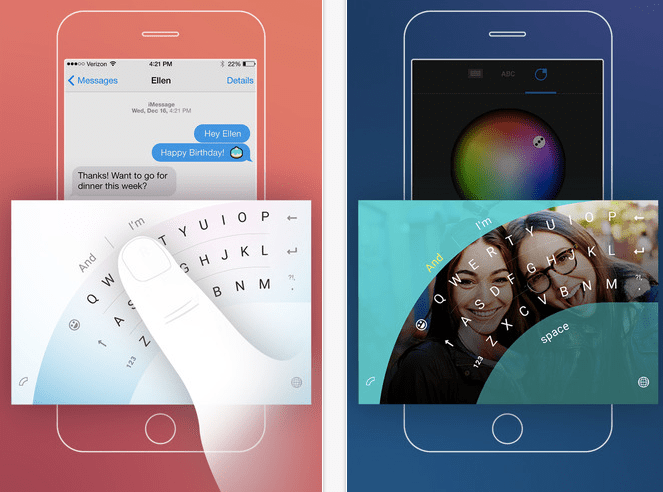
Microsoft has released a next-word predicting keyboard as an iOS app as it seeks to tap into the popularity of Apple’s mobile ecosystem in the hopes of expanding its influence in the mobile productivity space.
The Word Flow app, which was developed by Microsoft’s in-house experimental projects division, Garage, is now live in the U.S. App Store — although it’s not yet available in Europe.
Earlier this month the company had offered beta sign-ups for iOS users but it’s now flicked the switch for users in the U.S. The app was originally developed for its own smartphone platform (née Windows Phone), and has also been offered to users of its desktop product, Windows 10.
As well as next word predictions, the Word Flow app offers the promise of faster texting via a swipe to type input — a la other keyboard apps like Swype. A little more novel is a one-handed typing mode that displays the keyboard as an arc in order to allow for easier typing via just a thumb. Users can also customize the look and feel of the Word Flow keyboard
Keyboard tech was one of the ways Microsoft sought to advance the fortunes of its Windows Phone platform in the early years, as it battled to poach market share from more dominant rivals. One reason to focus its efforts on the keyboard was that Apple initially blocked developers from offering system-wide keyboards on iOS, and was alsoarguably slow to add more advanced features to the native iPhone keyboard leaving a gap for others to exploit.
However, Cupertino changed its stance on system wide keyboards with 2014’s iOS 8, opening up to outside developers and also loading more capabilities into the native keyboard (such as its own next-word prediction tech). Meanwhile, Microsoft’s hopes of building mobile market share momentum, and making a dent in the Android-iOS duopoly, failed to materialize forcing the company to double-down on building apps to try to make a major mark in mobile.
To further this strategy, back in February Microsoft shelled out $250 million to acquire London-based keyboard maker SwiftKey, an early mover in the next-word prediction keyboard tech space. It said at the time that it would be integrating SwiftKey’s technology into its existing Word Flow tech — as well as exploring “scenarios for the integration of the core technology across the breadth of our product and services portfolio.”
Microsoft also said it would continue to offer SwiftKey’s apps, whose functionality clearly overlap with its own Word Flow product — albeit the former can boast rather greater usage. At the time of the acquisition by Redmond, SwiftKey had amassed installs on some 300 million devices across Android, iOS and its SDK products (the vast majority on the Android platform).
Word Flow is not Microsoft’s only keyboard offering. Its Garage division has produced another keyboard app, called Hub, which was on iOS already. But that keyboard app focuses on multitasking and productivity for Office 365 users by letting them search for and share documents from other Microsoft services such as OneDrive and SharePoint. Which is rather less interesting than more open productivity keyboard plays, such as Barcelona-based keyboard startup ThingThing.
While messaging apps have demonstrated the ability to scale out a platform on (another’s mobile) platform, with WhatsApp, for example, passing the 1 billion monthly active users mark earlier this year, it’s far less certain that productivity apps like keyboards can hope to achieve such scale.
Indeed, SwiftKey’s exit to Microsoft suggests there are far harder and more bounded margins on potential growth in the productivity app space. (Which then rather does raise the question why Microsoft has not focused more resources on driving the development and market share of that well-known messaging app Skype that it acquired way back in 2011… ah those Redmond dreams of what could have been!)


 Popular
 Tags
Tags Videos