Wearables have the ability to improve health and give us insights into our mental state — all we need are the apps that can analyze and quantify the data.
Missouri startup Mindset, created by engineering students at Washington University of St. Louis, has launched an app aimed at stress management. It uses wearable data to indicate rising stress levels and a mobile app to for users to lower stress levels and give feedback.
Mindset alerts the user with a smartphone ping, if they see rising stress levels. The main indicator will be from an increase in heart rate and from there users tell the mobile app what is bothering them.
Mindset gives you chill options
Different types of meditation and exercises are provided on the app. A message board is available for users to update with positive vibes reports; we’re not sure if moderators will remove negative status updates.
The developers believe that controlling emotions at critical times is the best way to lower stress. The goal is not to remove all stress at once, an impossible task for some, but to lower the amount of time stressed.
Multiple studies have shown that a stressful environment could knock a few years off your life, so it is very important that we have apps like Mindset available.
And since the workplace is one huge source of our stress, Mindset may find a ready market in the enterprise sector.
A recent report by market intelligence firm Tractica says wearables will be a big deal with enterprise users in the near future, perhaps to the point of replacing your gym membership with a Fitbit streaming back to your HR department…which may stress you out even further.
iOS and Android users can pick up Mindset today for free, but it does require a wearable to work properly. On the startup’s website, it recommends three wearables from Mio, but we assume Fitbit and other wearables support the app.
Wearables have the ability to improve health and give us insights into our mental state — all we need are the apps that can analyze and quantify the data.
Missouri startup Mindset, created by engineering students at Washington University of St. Louis, has launched an app aimed at stress management. It uses wearable data to indicate rising stress levels and a mobile app to for users to lower stress levels and give feedback.
See Also: Richer, sicker seniors to drive medical wearables market growth
Mindset alerts the user with a smartphone ping, if they see rising stress levels. The main indicator will be from an increase in heart rate and from there users tell the mobile app what is bothering them.
Mindset gives you chill options
Different types of meditation and exercises are provided on the app. A message board is available for users to update with positive vibes reports; we’re not sure if moderators will remove negative status updates.
The developers believe that controlling emotions at critical times is the best way to lower stress. The goal is not to remove all stress at once, an impossible task for some, but to lower the amount of time stressed.
Multiple studies have shown that a stressful environment could knock a few years off your life, so it is very important that we have apps like Mindset available.
And since the workplace is one huge source of our stress, Mindset may find a ready market in the enterprise sector.
A recent report by market intelligence firm Tractica says wearables will be a big deal with enterprise users in the near future, perhaps to the point of replacing your gym membership with a Fitbit streaming back to your HR department…which may stress you out even further.
iOS and Android users can pick up Mindset today for free, but it does require a wearable to work properly. On the startup’s website, it recommends three wearables from Mio, but we assume Fitbit and other wearables support the app.
While plenty of WhatsApp fans were already chatting over the platform's web browser option, the rest of us can now join them on the desktop.
On Tuesday, WhatsApp launched its first-ever native desktop app — a simple step that makes sharing emoji with your friends a lot easier to hide from your boss behind a dozen web browser windows.
The app is available on both Windows 8 and Mac OS 10.9 or above, the company said in a blog post.
It's simple to set up. Download the desktop app, select your operating system, scan a QR code from your phone under the WhatsApp Web tab, and it will load your existing conversations. Usage is largely the same as on mobile — you'll be able to share photos in the same way, among other functions.
Your phone needs to be connected to the Internet for the app to work however, so the company advises users switch to Wi-Fi to avoid burning through a lot of data.
With more than one billion users globally, many of whom may be largely mobile-only, it would be interesting to find out how many installs the desktop app actually clocks up. Let us know, WhatsApp?
Want to go party the night away but not sure where to go? Bar Roulette‘s brand new iOS app has you covered. Press a button to summon an Uber and it will take you to a bar picked from the highest-rated bars on Yelp and Foursquare. The twist? The app won’t tell you where you are going until you arrive.
Bar Roulette aims to break you out of your routines and add a bit of adventure to your life, taking you to places you may not have been before.
The app is simple, but elegant; tell it where you are and the approximate area you’d like to go to. The destination area can be as small as a mile or as broad as 10 miles. You then choose whether you want your destination chosen from Yelp or Foursquare; if you pick the latter, you can use Foursquare’s price filters to select a destination that fits how fat and sassy your wallet is feeling that day. The app shows you the distance and estimates what your Uber will cost. Hit confirm and you’re on your way to merriment and adventure.
Related Articles
Uber denies plans to kill surge pricing in the U.S.Uber is facing a nationwide class-action lawsuitGoogle, Uber, Lyft join automakers in self-driving car lobbyBar Roulette Is Exactly What It Sounds Like
Of course, the app also checks whether your destination bar is open, so it’s helpful for late-night (or early morning) bar hopping, too.
The app is free, but there’s a $2.99 in-app purchase that unlocks the use of Foursquare with the bar-price filtering, as well as the ability to view in the Bar History section bars you’ve discovered with Bar Roulette.
“We have some good new features in the works,” Bar Roulette’s creator Tyler Swartz says, “one of those is the option to exclude Foursquare bars you’ve already checked in at, to increase the chance that we’ll take you somewhere you haven’t been before.”
I can’t say that the app solves a problem I have: I usually can’t remember where I ended up anyway… But if micro adventures are your thing, this may just be one way to shake up your routine a little bit.
Messaging apps like WhatsApp and WeChat have become the platform giants of recent years, scaling huge user bases powered by the momentum of network effects. But might there be another location on the smartphone that’s potent enough for an app to transform into a platform in its own right? Barcelona-based startup Thingthing reckons there is. And their bet is that it’s the Qwerty keys that live under smartphone users’ fingertips that could be the next big thing on mobile.
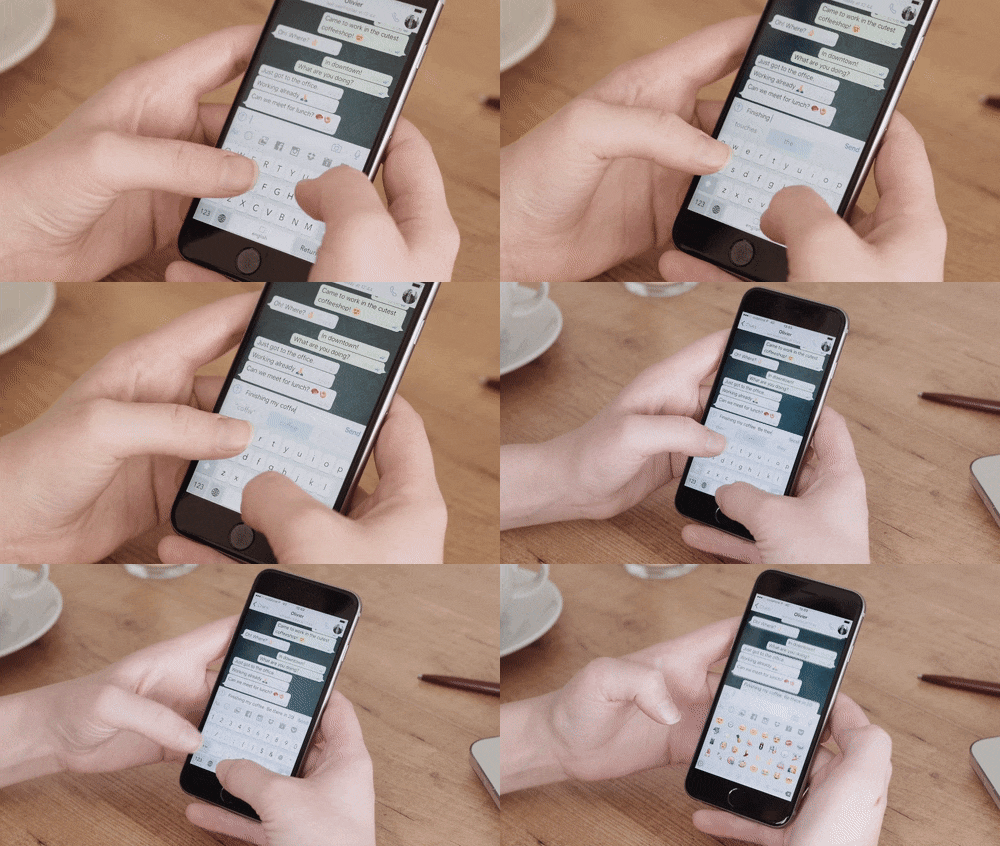
Thingthing has built an iOS keyboard app focused on amping up user productivity by decreasing the amount of app switching users have to do by loading productivity-focused additional functionality into the keyboard — just tap on one of the command keys above the Qwerty keys to summon your camera roll, or a stack of trending GIFs, or a list of your recent Dropbox files, or a multi-day view of your calendar, and so on. The select slice of data is displayed in the place where the keyboard was just before you hit the icon.
Third party accounts that can be linked to Thingthing’s keyboard at this point include Dropbox, Box, Google Drive, Facebook, Instagram, Flickr, Pocket and Todoist. The app can also be connected to your phone’s camera roll and calendar. And of course, as must be the case for any self-respecting keyboard app, there’s an icon to shortcut to your emoji — and emoji suggestions built into the keyboard’s next word prediction tech.
With linked third party apps/services Thingthing is plugging into the relevant APIs to support the particular functionality being offered — such as, for example, the ability to view and share files from your Google Drive. It’s also thinking a lot about designing the options it offers users. It’s not pulling everything into such a tiny space; just what it thinks someone with something to type quickly really needs to see/grab. Plante dubs these “contextual actions”.
Examples include the ability to select and paste a photo into the message you’re typing. Or to select and send a few possible calendar dates. The core idea here is to allow the user to gain swifter access to information siloed away in a third party service at the moment they are tapping out a message — and without needing to tap away to that other app — to speed up related communications, whether someone is trying to arrange a meeting via email. Or chatting with friends on WhatsApp.
A few taps on the Thingthing keyboard and you can grab the right calendar dates or fire a photo right into your chat without needing to tap away from whatever messaging app you were using.
What’s really interesting here is that the keyboard cuts across different services, and can therefore act as the connective tissue linking multiple services — doing away with the need for users to visit another app directly for simple use-cases (like grabbing a file).
And while a keyboard might not appear, at first pass, to have the massive network pull of a social or messaging giant, there’s a clear sub-set of pro-users who will appreciate the immediate productivity gains in the short term. And potentially a wider audience beyond that — if even more compelling short-cuts can be loaded right into the keyboard in future, as Thingthing is hinting will be its direction of travel.
Thingthing is today announcing it’s closed a €350,000 ($400k) seed round, led by Simile Venture Partners. Other investors in the round include Saatchinvest, Pioneers Ventures, Seedcamp (with the team having recently gone through their winter bootcamp program), plus some business angels.
It’s also talking about having secured partnerships with “leading brands” — although it’s not specifying exactly who or what those partnerships entail at this point. More details will be shared on this in the coming year, co-founder and CEO Olivier Plante tells TechCrunch. An Android version of the keyboard is also in the works.
“They’ve seen the opportunity in a keyboard being a platform,” says Plante of Thingthing’s investors. “Being something transversal everywhere, that can provide much more than just productivity tools.”
Commenting on the funding in a statement, Tatiana Kim, managing partner at Simile Venture Partners added: “Mobile has become the primary channel of communication and messaging is an essential part of our user experience. Thingthing is tackling a problem of efficiency in users interaction in a novel and intelligent way. We appreciate that the team is focused on user-centered design, has clear vision of development strategy and ambition for global coverage.”
Of the six brand partnerships Plante says that some are “leaders in productivity” and others are “leaders in services”.
“We’re working on something where the vision is ‘just type’ — so where people only type and while they’re typing they can access other services,” he continues. “This is something that we call contextual information. So depending on the context you can access services that go beyond just productivity.”
“Facebook is trying to do something around messaging around these lines but we believe that the keyboard is extending everything,” he adds.
TechCrunch last covered Thingthing back in September, soon after it had launched the first version of its app — which did not initially include an actual Qwerty keyboard, requiring users to toggle to use the native iOS keyboard (or another keyboard app of their choice). At the time we lauded the clean design and the strength of the core idea.
Since then the rather large missing piece that has been locked down by Thingthing is an actual keyboard of its own, with the team building next word prediction tech (currently just for English), and using public data sources such as Twitter and Reddit to train its learning algorithms, according to Plante.
“We built our own keyboard, with our own algorithms,” he says. “We built that from scratch. And at the speed we’re going we’re at the level where — SwiftKey did something in eight years, we can do what SwiftKey did in about three years and a half.
“The algorithm was built by our CTO who has been doing work around machine learning and AI. He was able to in opposite to what SwiftKey has built — because SwiftKey needs your data to be really intelligent, so the more your connect things the more it is intelligent, we were able to create a machine learning AI from public data.”
At this early stage Plante says Thingthing has around 20,000 monthly active users. “People have typed a lot of words!” he adds, estimating it at between three to four million words at this point. “This is an aggregated data. Pure analytics. We don’t see any words, we just infer.”
A compact, three-day on-screen calendar view is a new feature in the latest update to the app, plugging in a useful, at-a-glance overview of your availability for the current and two following days. Flick a finger back or forth to go back in time to check where you were, or scroll further into the future week. Want to suggest three possible appointment slots for a meeting? Tap on the times on the relevant day/s and then hit the transfer button that pops up at the bottom corner as slots are selected and the graphical data wings into the message you were typing — but now in text form, specifying the day, date, time and timezone. Truly delightful design.
Thingthing will be working next on ways to simplifying sharing group meeting info via the calendar, according to Plante. “We’re going to create experiences that are solving complex problems. Not life threatening problems but things that help. And where Thingthing becomes the hub of everything — you can do so much more stuff with this,” he adds.
With third party keyboard apps there can of course be very sizable privacy concerns, given how much data a user is potentially handing over to an outside entity when they agree to grant them ‘full access’. And Thingthing is also asking for access to a raft of additional services — so there are potentially hugely magnified privacy concerns here. And Plante knows it. Which is why he stresses “privacy by design” as a core principle for the team, noting, for example, that ThingThing stores all data relating to users locally, on their device (in the shell app), not on its servers.
That said, whatever additional data partnerships Thingthing is cooking up to power its future services push may, inevitably, clash with a privacy first ethos. Or at very least open up some fresh privacy concerns, depending on the entities that are being plugged into the keyboard and how Thingthing goes about informing users about the privacy trade-offs they might be making as they type.
“We don’t rely on your private data for now, and if we rely on it in the future it’s because there’s really a reason for it — it will be better for you as a user,” is how Plante squares this future circle.
Passport Inc. raised $8 million in a Series B round of funding to help cities make parking and transportation systems easier for people to use, and harder for them to abuse.
MK Capital led the investment in Passport, joined by Grotech Ventures and Relevance Capital. The new round brings Passport’s total capital raised to $17 million.
The Charlotte, North Carolina startup provides the cloud-based software behind city transit and parking apps including: ParkBoston, ParkChicago, Toronto’s Green P Parking app,GoTuscon, and others across the U.S. and in Canada.
Among other thing, Passport-powered apps let users pay for parking with their phones instead of with a credit card swipe or quarters at the meter, apply for and attain parking permits, buy mobile tickets or passes for trains and buses, and pay off their parking tickets or other citations by phone.
On the back-end, the apps help city offices and employees share real-time data about what’s happening within their various transit and parking systems, and make decisions about where to dedicate more law enforcement, other personnel, money and resources.
According to CEO Bob Youakim, the startup was cashflow positive before raising the Series B round.
He said Passport would use its capital for hiring, international expansion beyond North America, and to add to the feature set of Passport’s apps. But he declined to disclose what, specifically, is in the works.
Apps to help cities adapt as autonomous vehicles hit the road are a long-term possibility, he said.
Competitors to Passport include other venture-backed, enterprise tech providers to cities and their transportation-related offices, such as Transloc, Masabi or SilverRail Technologies, along with larger tech companies that have long been playing in the “smart cities” space with a focus on transportation such as IBM or Xerox.
Microsoft has released a next-word predicting keyboard as an iOS app as it seeks to tap into the popularity of Apple’s mobile ecosystem in the hopes of expanding its influence in the mobile productivity space.
The Word Flow app, which was developed by Microsoft’s in-house experimental projects division, Garage, is now live in the U.S. App Store — although it’s not yet available in Europe.
Earlier this month the company had offered beta sign-ups for iOS users but it’s now flicked the switch for users in the U.S. The app was originally developed for its own smartphone platform (née Windows Phone), and has also been offered to users of its desktop product, Windows 10.
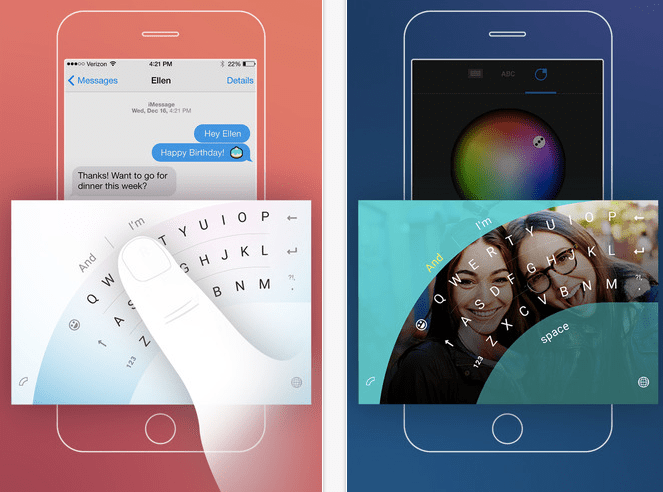
As well as next word predictions, the Word Flow app offers the promise of faster texting via a swipe to type input — a la other keyboard apps like Swype. A little more novel is a one-handed typing mode that displays the keyboard as an arc in order to allow for easier typing via just a thumb. Users can also customize the look and feel of the Word Flow keyboard
Keyboard tech was one of the ways Microsoft sought to advance the fortunes of its Windows Phone platform in the early years, as it battled to poach market share from more dominant rivals. One reason to focus its efforts on the keyboard was that Apple initially blocked developers from offering system-wide keyboards on iOS, and was alsoarguably slow to add more advanced features to the native iPhone keyboard leaving a gap for others to exploit.
However, Cupertino changed its stance on system wide keyboards with 2014’s iOS 8, opening up to outside developers and also loading more capabilities into the native keyboard (such as its own next-word prediction tech). Meanwhile, Microsoft’s hopes of building mobile market share momentum, and making a dent in the Android-iOS duopoly, failed to materialize forcing the company to double-down on building apps to try to make a major mark in mobile.
To further this strategy, back in February Microsoft shelled out $250 million to acquire London-based keyboard maker SwiftKey, an early mover in the next-word prediction keyboard tech space. It said at the time that it would be integrating SwiftKey’s technology into its existing Word Flow tech — as well as exploring “scenarios for the integration of the core technology across the breadth of our product and services portfolio.”
Microsoft also said it would continue to offer SwiftKey’s apps, whose functionality clearly overlap with its own Word Flow product — albeit the former can boast rather greater usage. At the time of the acquisition by Redmond, SwiftKey had amassed installs on some 300 million devices across Android, iOS and its SDK products (the vast majority on the Android platform).
Word Flow is not Microsoft’s only keyboard offering. Its Garage division has produced another keyboard app, called Hub, which was on iOS already. But that keyboard app focuses on multitasking and productivity for Office 365 users by letting them search for and share documents from other Microsoft services such as OneDrive and SharePoint. Which is rather less interesting than more open productivity keyboard plays, such as Barcelona-based keyboard startup ThingThing.
While messaging apps have demonstrated the ability to scale out a platform on (another’s mobile) platform, with WhatsApp, for example, passing the 1 billion monthly active users mark earlier this year, it’s far less certain that productivity apps like keyboards can hope to achieve such scale.
Indeed, SwiftKey’s exit to Microsoft suggests there are far harder and more bounded margins on potential growth in the productivity app space. (Which then rather does raise the question why Microsoft has not focused more resources on driving the development and market share of that well-known messaging app Skype that it acquired way back in 2011… ah those Redmond dreams of what could have been!)
This week was the official one-year anniversary of the Apple Watch. I've owned one for almost all of that time, and — like many tech journalists and gadget commentators — I believe it's worth reflecting on what the Apple Watch has meant to the tech world, the wearables category, and Apple.
I didn’t actually get my Apple Watch until May 5. The reasons for that 11-day delay have to do with poor band choices and a a big chunk of FOMO, but 51 weeks is still enough time to write a reflective analysis.
Let's talk about apps
A lot of us thought apps would end up making or breaking the Apple Watch. A year later, I have to admit that I use very few non-native apps on the Apple Watch.
Part of that is because of how apps on the watch work. In the first six months the watch was available, the non-native app experiences on the watch were slow. The slowness of these apps — coupled with the staggered rollout of the watch itself — was my chief complaint/fear about the Apple Watch, one month into using the device.
After announcing watchOS 2.0 in June 2015, Apple rolled it out in September, which allowed developers to build faster watch apps that were native to the device.
WatchOS 2 was a good step forward, but coming five months into the product’s life cycle, I do wonder how much it hurt developer momentum, in turn crippling Apple Watch app quality.
As it stands, a lot of companies were quick to jump on the Apple Watch bandwagon, but a year in, there still aren’t many third-party apps I use regularly or can even name.
Part of the reason I don’t use Apple Watch apps is speed. Even with watchOS 2’s native code, loading an app and opening it up can often take more time than just grabbing my phone, which is always by my side anyway. And with a few exceptions, I haven’t really run into any apps that I feel offer a truly superior wrist experience.
IMAGE: LUKE LEONARD/MASHABLE
That said, I do enjoy a number of the built-in apps. The Music app is great and I often like to use it to control what I’m listening to while running. I also love having my calendar on my wrist.
As with the Pebble smartwatch, the true “killer app” for the Apple Watch is notifications. I love getting notifications on my wrist. I like getting alerted that my Uber is ordered and on its way, my Postmates is at the door. I also like being able to answer or decline phone calls from my wrist.
And I love having iMessage on my wrist. Depending on the type of notification, you can often reply right on the watch, which is great. This can be as simple as marking an email as “read” or flagging it. Using Siri, I can even respond to a text message.
I didn’t buy the Apple Watch as a fitness device, but I do think the Activity feature is one of its strongest features. Each day, I’m motivated to earn my circles for standing at least once every hour. I also like seeing how many calories I’ve burned and how many minutes I’ve spent exercising.
The health and exercise functions aren’t demonstrably different form what I could do on a Fitbit, but the interface of the Apple Watch is better.
Still, I can’t help but be disappointed that the app story on Apple Watch hasn’t turned out better. I do think there are probably more compelling ways I could use my Apple Watch that I haven’t. That's partly because app discovery — a problem across the App Store — isn’t great on the watch.
But truthfully, I also think we’ll need more powerful hardware to really do some intersting things on the wrist. The big question I have, however, is: A year in, do developer’s still care?
Battery life
A chief complaint when the Apple Watch launched was that it offered just a day of battery life. Especially when compared to the Pebble or Pebble Time, this wasn’t great.
I’ve found I wear my Apple Watch from about 30 minutes after I wake up to about 30 or 45 minutes before I go to bed. Although I have to charge my watch every day, I do get a full day of battery life from the watch.
That doesn’t mean there haven’t been moments when the watch has died before the day has ended. And I keep an extra charger on my desk just in case I need a quick charge.
IMAGE: LUKE LEONARD/MASHABLE
As critical as many of us were about the battery life limitations at launch, a year later, I don’t actually think it's been that big of a deal. Provided you take your watch off anyway, the real trick is just to find a good/consistent place to charge it each night.
I will say that traveling with the watch charger has proven to be more of a challenge. There are some smart accessories that make the process easier, but the reality is that when I go on a trip — even for a day — I need to make sure I have my Apple Watch charger packed too.
Style
When I think about how much money I’ve spent on the Apple Watch in the last year, both on the watch itself and the various bands I’ve purchased, the figure is over $1,000.
If I try to rationalize that as a tech purchase, that’s actually sort of difficult. I really like my Apple Watch, but was it worth as much as I spent on my iPad Pro?
Oddly, I have a much easier time rationalizing the price when I consider that for me, as a woman, this product was every bit as much of a fashion accessory as it was a tech gadget.
In that realm, $250 on a watchband isn’t that ridiculous. Similarly, I don’t mind spending $50 a pop on various sport bands.
Even after a year, I still get compliments on my watch on a frequent basis. I recently moved to anew color band (for Spring) and get compliments all the time.
Not everyone loves the Apple Watch’s design, but for me, a year later, it’s something I’m not embarrassed to wear on my wrist. Plus, I get a kick out of customizing my band based on my outfit.
Has it changed my life?
Over the last year, I’ve worn my Apple Watch (the 38mm stainless steel version) nearly every single day. Part of this is because after spending more than $800 on the accessory, I wanted to be sure to get my money’s worth.
But it also quickly became a habit and something I’ve grown accustom to having on my wrist.
Still, if asked, “Has this changed my life?" the short answer is, “No, no it hasn’t.”
I wear my watch almost every day but I should note that if I forget to put my watch on in the morning and I don’t realize until I’m already outside my apartment, I’m not going to turn back around to retrieve it. I tend to reserve those sorts of moments for my keys, my wallet and my iPhone.
But that isn’t to say I don’t miss the watch when it’s not on. I love getting notifications on my wrist. I like getting reminders to stand up and affirmations for reaching my exercise and calorie goals.
And frankly, as a watch, I use it quite a bit. It’s also nice to quickly glance at my wrist to see the weather or what appointments I have coming up.
So yes, I miss the Apple Watch when I’m not wearing it, but I’m not someone who has had a transformational experience from the watch. I prefer wearing it, but if I forget it for a day? Well, I still have my phone.
And frankly, that’s probably the biggest challenge Apple will continue to face with the Apple Watch: convincing people to allow an accessory that is nice, but not life changing, onto their wrist.
Looking forward
We’re already hearing a number of rumors about the next Apple Watch, which is reportedly planned for a September release.
Potential cellular connectivity aside (something I’m not convinced is wanted or needed), many of these rumors point to subtle changes rather than a huge overhaul.
Earlier this month, my colleague Lance Ulanoff argued that minor updates aren’t enough and that Apple needs to do more to get the price down and target teen consumers.
I agree on the price point (getting the watch down to the $199 mark for the Apple Watch sport would be huge), but I’m OK if the watch has only minor cosmetic updates.
Where I strongly agree with Lance is that some of the interface decisions need to be rethought. Part of the reason I don’t use apps on my watch — in addition to the slowness — is because the interface, even a year in, is often not as intuitive as it should be.
I would love to see Apple do a lot of work into the experience of the watch better and more robust.
I would also like to see Siri on the watch — something that often works quite well — to be expanded. I should be able to open apps with Siri or complete other tasks. I want to be able to talk to my watch the same way I can talk to my Amazon Echo.
For now, however, I’ve enjoyed my year with the Apple Watch. It’s not the perfect wearable — and it hasn’t changed my life — but I don’t want to take it off.
News that Google would soon begin testing a new mobile travel application leaked out last week, and now we have more details, including screenshots, of what that app will look like. The app, called Trips, is being trialed with a small group of testers, and will allow users to keep track of past and upcoming trips, while also making recommendations about tourist destinations, restaurants, local transportation options, and more.
Access to the Trips mobile app is only being made available to members of Google’s Local Guides program.
One of those benefits, as Google previously indicated, is early access to new Google products and features. This appears to be one example of that perk in action.
According to the initial leak, Local Guides were invited to be among the first to try a new “travel assistant app for Android and iPhone.”
What’s interesting about the new app is that it’s able to pull in your trip information just by scanning your Gmail messages, similar to how Google’s virtual assistant, Google Now, also works.
That makes it slightly competitive with TripIt, which has the larger goal of helping to automate collection of your trips into a single interface, then provide useful services on top of that, like tracking points, getting flight alerts, setting reminders, changing seat selections, sharing trips with others, and more.
However, in the case of the Google Trips app, it seems the focus is less on mimicking the somewhat utilitarian nature of most travel planners and companion apps, and more on the fun that comes with exploring a new destination.
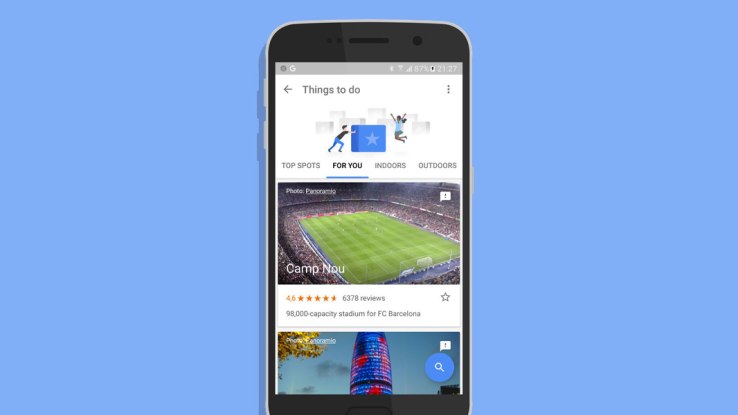
As an app built using Google Maps data, Trips lets you find things to do – both inside and outdoors – around your location. It also helps you manage reservations, find nearby food and drink, access a list of saved places, and plan how you’ll get from one place to the next.
For this reason, Trips would likely have more of an impact on local travel guide apps, instead of more comprehensive trip planners.
GoPro on Thursday very quietly took the wraps off its new developer program, by which it hopes to get its action cameras hooked into as many third-party devices, vehicles and services as possible. The program was announced at a private event in San Francisco, where it showed off the fruits of various partnerships.The Periscope integration announced earlier this year is an example of what the company is hoping to achieve. There was also a snap-on time-code system that you can use to sync your footage (announced last week, but still new), a mount for kids’ toys from Fisher-Price and add-ons for tracking your route and vital statistics when parasailing, skiing and other extreme activities — you get the general idea. Partnerships with BMW and Toyota also suggest more automotive applications in the future.
Perhaps the coolest item, shown off at the end of this highlight video, was a gesture-based camera control system for when your motorcycle gloves or [insert extreme garment here] prevent you from operating the app.
The hope, presumably, is that this will extend GoPro’s reach and restore the company’s luster (and sales) after a disappointing earning report. Turns out people don’t buy a new action camera every year or so, unlike iPhones. But dozens of cool new applications and accessories could bring in new users, put more miles on existing cameras — or leverage features only available in the latest model.
There’s also a “Works with GoPro” badge now — it’s sort of a rite of passage in consumer electronics to get big enough to require curation of accessories, and then name that curation process the exact same thing as everyone else’s.










 Popular
 Tags
Tags Videos